Build a Multi-Model AI Gateway with LiteLLM and Docker
Managing multiple AI providers separately can quickly become difficult as applications grow. Different APIs, authentication methods, pricing structures, and model capabilities often force developers to maintain several integrations at once. A centralized AI gateway solves this problem by creating a single entry point that routes requests to different large language models. Here you will know about multi-model AI routing, LiteLLM setup, AI model gateway & More.
LiteLLM combined with Docker provides an efficient way to build a self-hosted AI gateway. Instead of connecting applications directly to OpenAI, Anthropic, Azure OpenAI, or other providers, developers can send requests through one OpenAI-compatible endpoint and manage routing from a single configuration file.
This guide explains how to deploy LiteLLM with Docker, configure model routing, secure your environment, and prepare the gateway for future scaling.
Why Use LiteLLM as an AI Gateway?
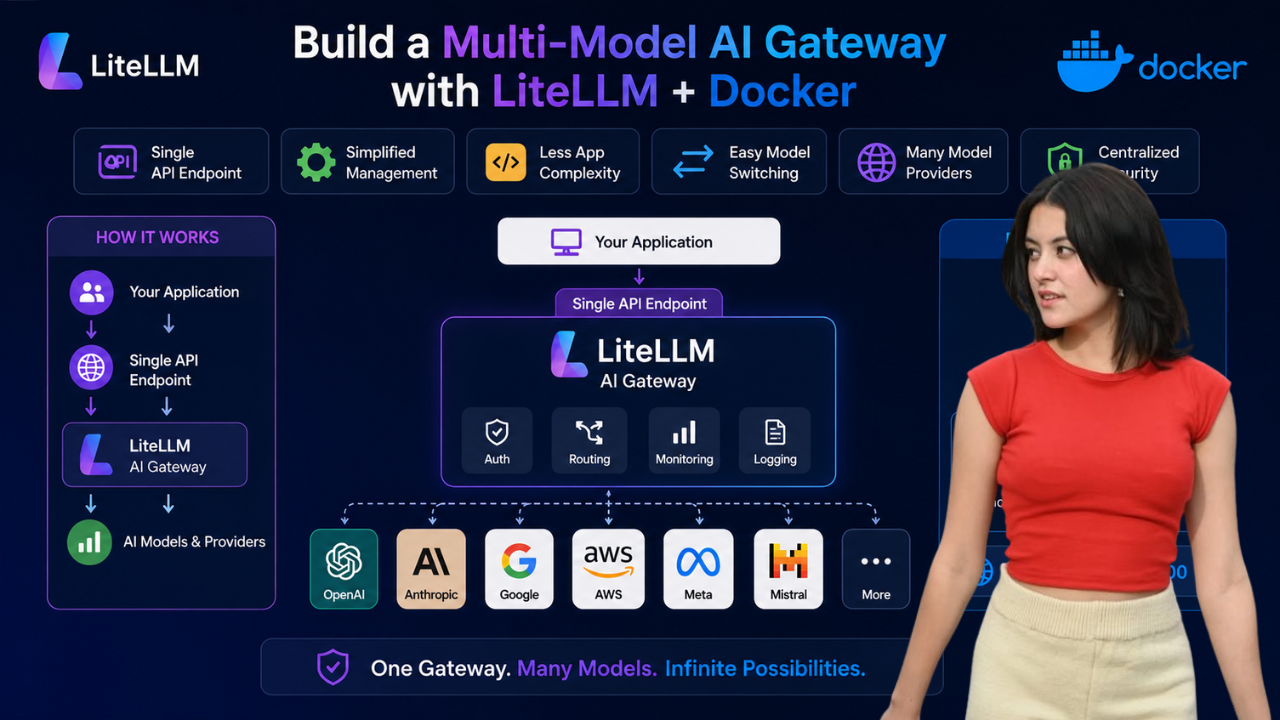
LiteLLM acts as a translation and routing layer between your applications and multiple AI providers.
Benefits include:
- Single API endpoint for all AI models
- Simplified provider management
- Reduced application complexity
- Easy model switching without code changes
- Support for numerous LLM providers
- Centralized authentication and monitoring
Instead of updating every application whenever a model changes, you only update the gateway configuration.
How an AI Model Gateway Works
A typical AI gateway workflow follows these steps:
- An application sends a request to LiteLLM.
- LiteLLM receives the request.
- The gateway checks its routing configuration.
- The request is forwarded to the selected provider.
- The provider returns a response.
- LiteLLM sends the result back to the application.
This approach creates a flexible architecture that can adapt as AI providers evolve.
Prerequisites Before Deployment LiteLLM setup
Before deploying LiteLLM, ensure your server includes:
- Docker installed
- Docker Compose installed
- A Linux VPS or cloud server
- Access to at least one AI provider API key
- Basic command-line knowledge
A VPS with 2 GB RAM is typically sufficient for small deployments.
Create a LiteLLM Project Directory
Begin by creating a dedicated workspace.
mkdir litellm-gateway
cd litellm-gateway
This directory will store configuration files, Docker settings, and environment variables.
Configure LiteLLM Routing for LiteLLM setup
Create a configuration file named:
nano litellm_config.yaml
Add the following configuration:
model_list:
  - model_name: gpt-4o-gateway
    litellm_params:
      model: openai/gpt-4o
      api_key: os.environ/OPENAI_API_KEY

general_settings:
  master_key: os.environ/LITELLM_MASTER_KEY
This configuration defines a public model name that applications can call while specifying which backend model should process requests.
Store API Credentials Securely
Avoid placing credentials directly inside configuration files.
Create an environment file:
nano .env
Add:
OPENAI_API_KEY=your-openai-key
LITELLM_MASTER_KEY=your-master-key
Using environment variables improves security and simplifies credential rotation.
Create a Docker Compose Configuration
Create a Compose file:
nano docker-compose.yml
Insert the following:
services:
  litellm:
    image: docker.litellm.ai/berriai/litellm:main-latest
    container_name: litellm-gateway
    env_file:
      - .env
    volumes:
      - ./litellm_config.yaml:/app/config.yaml
    ports:
      - "4000:4000"
    command: ["--config", "/app/config.yaml", "--port", "4000"]
    restart: unless-stopped
This configuration launches the LiteLLM proxy and exposes it on port 4000.
Start the AI Gateway
Launch the deployment using Docker Compose:
docker compose up -d
Verify the container is running:
docker ps
View logs:
docker logs litellm-gateway
Successful startup indicates the gateway is ready to receive requests.
Test the Gateway Endpoint
Send a request to verify routing works correctly.
curl http://localhost:4000/chat/completions \
-H "Content-Type: application/json" \
-H "Authorization: Bearer your-master-key" \
-d '{
  "model": "gpt-4o-gateway",
  "messages": [
    {
      "role": "user",
      "content": "Explain an AI gateway in one sentence."
    }
  ]
}'
A successful response confirms:
- The Docker container is operational
- Configuration files are loaded correctly
- Authentication works
- Requests reach the provider
Add Multiple AI Models
The true power of LiteLLM appears when routing requests to different models.
Update your configuration:
model_list:
  - model_name: gpt-4o-gateway
    litellm_params:
      model: openai/gpt-4o
      api_key: os.environ/OPENAI_API_KEY

  - model_name: gpt-4o-mini-gateway
    litellm_params:
      model: openai/gpt-4o-mini
      api_key: os.environ/OPENAI_API_KEY

general_settings:
  master_key: os.environ/LITELLM_MASTER_KEY
Restart the service:
docker compose restart
Applications can now choose between multiple model routes while using the same API endpoint.
Common AI Routing Strategies
Many teams use LiteLLM to implement intelligent routing.
Route by Task Complexity
Send advanced reasoning and coding tasks to larger models while directing simple content generation to smaller models.
Route by Provider
Maintain a single API format while distributing requests across multiple AI vendors.
Route by Cost
Reserve premium models for critical workloads and use lower-cost models for background processing.
Route for Redundancy
Configure fallback providers to maintain service availability during outages.
Securing Your AI Gateway
Security becomes increasingly important as usage grows.
Recommended practices include:
Protect SSH Access
- Disable root login
- Use SSH keys
- Change default SSH ports
Configure Firewall Rules
Allow only required services:
- SSH
- HTTPS
- Internal gateway traffic
Use HTTPS
Never expose production AI gateways over unsecured HTTP.
Protect API Keys
Store credentials in:
- Environment variables
- Secret management platforms
- Secure vault systems
Create Separate Access Keys
Issue individual LiteLLM keys for applications, users, and teams.
This improves auditing and limits the impact of compromised credentials.
Monitoring and Maintenance for multi-model AI routing
Production deployments require ongoing monitoring.
Track:
- Request volume
- Response latency
- Error rates
- Provider costs
- Resource utilization
Regular monitoring helps identify performance bottlenecks before they affect users.
Scaling Beyond a Single Container
A single LiteLLM container works well for:
- Development environments
- Internal tools
- Small production workloads
As demand increases, consider adding:
Multiple Proxy Instances
Run several LiteLLM containers to improve availability.
Load Balancers
Distribute requests across multiple gateway instances.
Shared Databases
Store usage data, team settings, and access controls centrally.
Redis Integration
Improve rate limiting and support distributed deployments.
Centralized Logging
Aggregate logs for easier troubleshooting and analytics.
Common Mistakes to Avoid multi-model AI routing
When deploying LiteLLM, avoid these frequent issues:
- Hardcoding API keys in configuration files
- Using unpinned Docker image versions
- Exposing the gateway directly to the internet
- Skipping HTTPS configuration
- Failing to monitor provider costs
- Scaling infrastructure prematurely
Starting simple and expanding gradually often produces the most reliable deployments.
LiteLLM and Docker provide a practical way to create a centralized AI gateway that supports multiple large language models through a single API endpoint. By separating applications from individual AI providers, teams gain flexibility, easier maintenance, and greater control over costs and routing behavior.
Whether you’re building internal AI tools, customer-facing applications, or a multi-provider AI platform, LiteLLM offers a scalable foundation for managing model access. With proper security practices, monitoring, and gradual scaling, a LiteLLM gateway can become a reliable part of your AI infrastructure.
Follow Us on Facebook