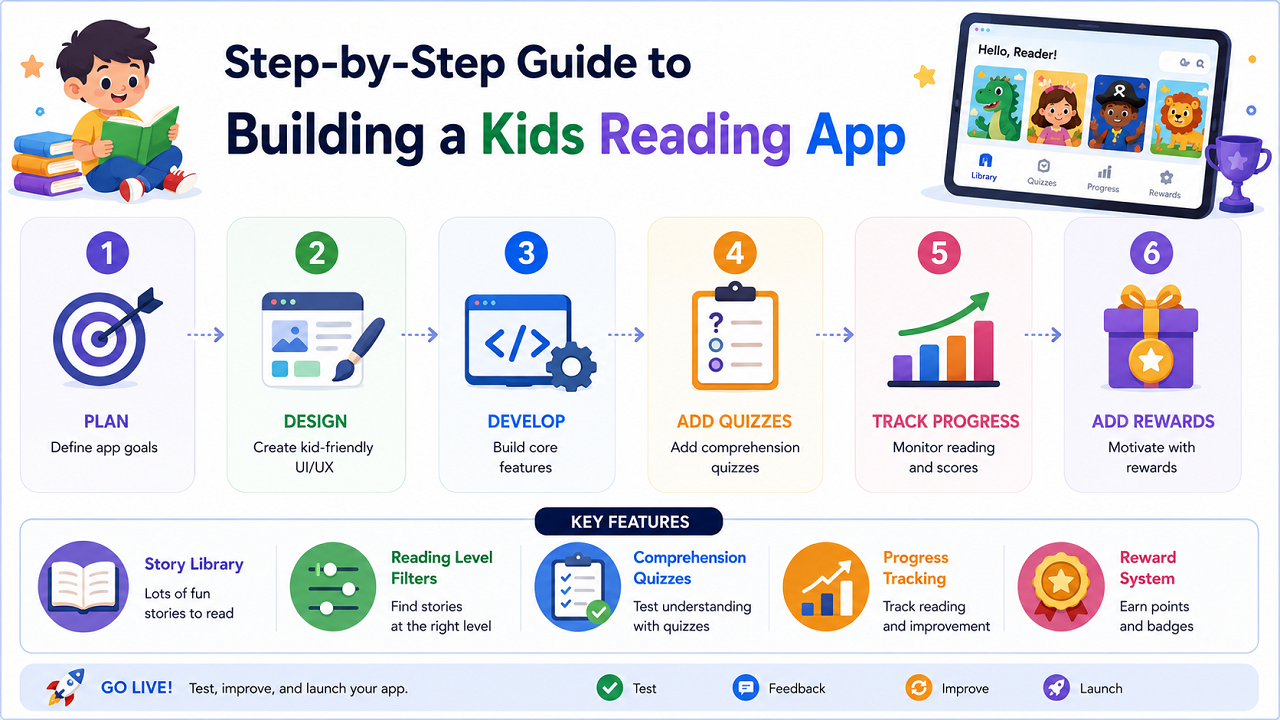
Step-by-Step Guide to Building a Kids Reading App
Reading is one of the most important skills children develop during their early years. A well-designed kids reading app can help young learners improve vocabulary, comprehension, and reading confidence while making the learning process enjoyable. Instead of relying solely on printed books or worksheets, children can engage with interactive stories, quizzes, rewards, and progress tracking from any device. Here you will learn about How to Build children’s reading app, educational reading app & any type of reading learning app.
Thanks to modern AI-powered website builders and no-code platforms, creating a kids reading app no longer requires programming knowledge. With the right features and structure, you can launch an educational reading platform for parents, teachers, tutors, or schools in a relatively short amount of time.
Why Build a Kids Reading App?
Children learn differently, and digital learning tools have become a valuable supplement to traditional reading methods. A reading-focused application helps create consistent learning habits while giving adults insight into a child’s progress.
Some common use cases include:
Supporting Daily Reading Habits
Parents can encourage regular reading by providing access to engaging stories and achievement-based rewards.
Classroom Learning Activities
Teachers can assign stories based on reading levels and monitor student performance.
Tutoring Programs
Tutors can use reading exercises and quizzes to identify strengths and weaknesses.
Homeschool Education
Families can incorporate structured reading practice into their homeschooling curriculum.
Essential Features for Your First Version Children’s Reading App
When building a reading application, focus on the core experience first.
Story Library
Create a collection of short stories categorized by age group, reading level, or topic.
Reading Level Filters
Allow users to browse content suitable for beginners, intermediate readers, or advanced learners.
Comprehension Quizzes
Add simple questions after each story to test understanding.
Progress Tracking
Display completed stories, reading streaks, quiz scores, and achievements.
Reward System
Use badges and milestones to motivate children to continue reading.
Starting with these features creates a strong foundation for future growth.
Designing the User Journey
A successful educational app should feel simple and rewarding.
A typical user flow may look like this:
- Child opens the app.
- Story recommendations appear.
- User selects a story.
- The story is displayed in a child-friendly reading format.
- A short quiz appears after reading.
- Progress updates automatically.
- Rewards or achievements are unlocked.
Keeping navigation straightforward helps children use the app independently.
Create a Kids Reading App with AI
AI-powered app builders can generate the first version of your platform in minutes. Instead of designing every screen manually, you can describe your requirements and let AI create the structure.
🚀 AI Prompt to Generate a Kids Reading App
Copy and paste the prompt below into your preferred AI app builder.
Create a kids reading app with an engaging and educational design.
Requirements:
- Include a colorful story library with visual story cards.
- Organize stories by age group and reading level.
- Create reading pages with large, easy-to-read text.
- Add comprehension quizzes after each story.
- Track completed stories and quiz scores.
- Display reading streaks and achievement badges.
- Include a parent or teacher dashboard.
- Allow users to filter stories by category and difficulty.
- Design the interface to be mobile-friendly and tablet-friendly.
- Use bright colors, child-friendly icons, and simple navigation.
Customizing the Reading Experience
Once the first version is generated, refine the experience for young readers.
Use Large Story Cards
Visual story previews make browsing easier and more engaging.
Focus on Readability
Use larger fonts, proper spacing, and distraction-free reading screens.
Create Age-Appropriate Themes
Different age groups may prefer different visual styles and content categories.
Simplify Navigation
Children should be able to move between stories, quizzes, and achievements without confusion.
Adding Learning and Progress Features
Educational apps become more effective when they include structured learning systems.
Story Completion Tracking
Automatically mark stories as completed once a child reaches the end.
Quiz Scoring
Calculate comprehension results after every reading session.
Reading Streaks
Encourage daily reading by rewarding consistent activity.
Level Advancement
Unlock more challenging content as children complete learning milestones.
These features help maintain engagement and encourage long-term usage.
Testing Before Launch your Children’s Reading App
Before publishing your application, test every major feature.
Verify the following:
- Stories open correctly.
- Reading pages display properly.
- Quiz answers calculate accurately.
- Progress updates automatically.
- Rewards unlock at the correct milestones.
- Mobile and tablet layouts function smoothly.
Testing with both children and adults can reveal usability improvements that might otherwise be overlooked.
Publishing Your Educational Reading App
After testing is complete, publish the application and begin sharing it with potential users.
Popular audiences include:
- Parents
- Teachers
- Tutors
- Schools
- Homeschool families
- Educational organizations
A reading-focused application can serve as a standalone product or become part of a larger educational platform.
Advanced Features to Add Later on Reading Learning App
As your user base grows, consider expanding the platform.
Audio Read-Aloud Support
Allow children to listen to stories while following the text.
Vocabulary Flashcards
Help readers learn and review new words.
Personalized Story Recommendations
Suggest content based on reading history and performance.
Parent Progress Reports
Provide detailed insights into reading habits and learning outcomes.
Reading Challenges
Create weekly and monthly goals to encourage participation.
These additions can significantly increase engagement and educational value.
Common Mistakes to Avoid
Many educational apps struggle because they overlook important usability factors.
Too Much Text on One Screen
Large blocks of text can overwhelm younger readers.
Ignoring Reading Levels
Children learn at different speeds, making level-based content essential.
Complicated Navigation
A simple interface improves independence and confidence.
Lack of Progress Feedback
Visible achievements help motivate continued reading.
No Adult Dashboard
Parents and teachers benefit from clear reporting and progress insights.
Why educational reading app Continue to Grow
Educational technology continues to expand as families and schools look for flexible learning tools. Reading applications provide a convenient way to support literacy development while making learning more interactive and enjoyable.
By combining engaging stories, comprehension activities, rewards, and progress tracking, a kids reading app can create a positive reading experience that encourages long-term learning habits.
Building a kids reading app is now more accessible than ever thanks to AI-powered development tools and no-code platforms. By focusing on age-appropriate content, engaging design, reading progression, and educational outcomes, you can create an application that helps children strengthen literacy skills while keeping them motivated to learn.
Whether your audience consists of parents, teachers, tutors, or schools, a well-designed reading platform can provide lasting educational value and support children’s reading development in a fun and interactive way.
Follow Us on Facebook