Create a Custom QR Code Generator for Businesses and Marketing
A QR code generator helps users instantly convert links, text, contact information, event pages, menus, and business details into scannable QR codes. Businesses, marketers, restaurants, event organizers, and creators use QR codes to connect offline materials with digital content quickly and efficiently.
Instead of relying on complicated software or multiple online tools, a modern online QR code maker allows users to generate, customize, preview, and download QR codes from one simple platform.
With no-code app builders and AI-powered development tools, creating a branded QR code generator is now easier for beginners, startups, and developers.
This guide explains how to build a professional QR code creator tool with live previews, download options, color customization, and mobile-friendly functionality.
Why Build a QR Code Generator?
QR codes are widely used across industries because they simplify customer interaction and improve accessibility.
Restaurants use QR codes for digital menus. Businesses add QR codes to product packaging and flyers. Event organizers use them for registration pages and tickets. Marketers include QR codes in advertisements, posters, and campaigns.
A custom QR code generator helps users create branded and scannable codes without technical knowledge.
Features Every QR Code Creator Tool Should Include
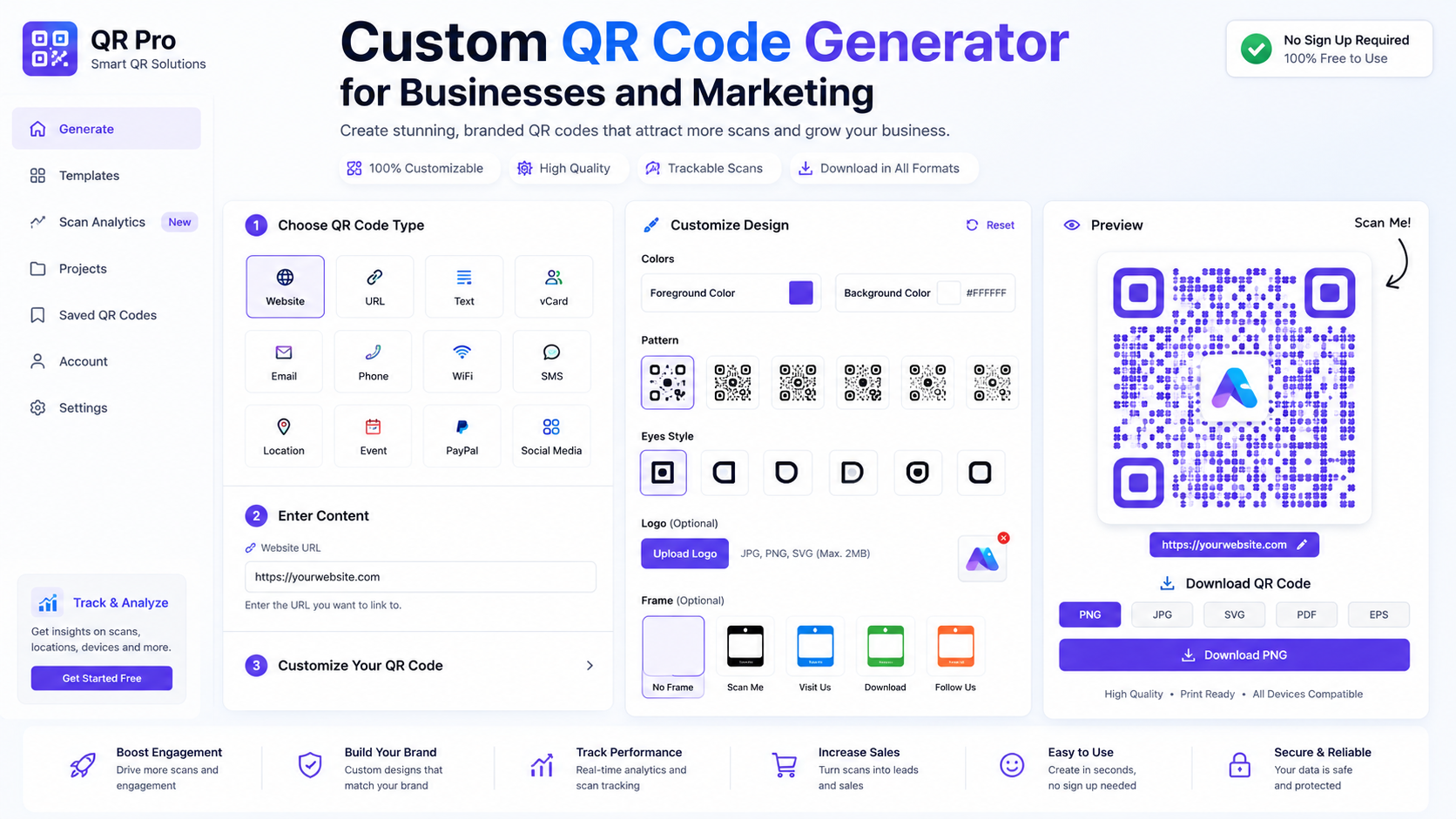
Live QR Code Preview
A professional QR code generator should instantly display the QR code preview as users type or edit content.
Live previews help users verify the final result before downloading or printing the code.
Multiple QR Content Types
An online QR code maker should support several content formats, including:
- Website URLs
- Plain text
- Email addresses
- Phone numbers
- Contact cards
- Wi-Fi credentials
- Event links
This makes the tool more flexible for different users and industries.
Customization Options
A branded QR code generator should allow users to personalize their QR codes with:
- Custom colors
- Background styling
- QR size controls
- Margin adjustments
- Logo placement
Businesses often need QR codes that match their brand identity.
PNG and SVG Downloads
Users should be able to export QR codes in multiple formats.
PNG files work well for websites and social media, while SVG files are ideal for print materials because they scale without losing quality.
Mobile-Friendly Design
Many users create QR codes directly from smartphones. The QR code creator tool should work smoothly across all screen sizes.
How to Build a QR Code Generator Website
Step 1: Define the Main Use Cases
Start by deciding what type of QR codes your platform will focus on.
Common use cases include:
- Restaurant menu QR codes
- Marketing campaign QR codes
- Event registration QR codes
- Business card QR codes
- Product packaging QR codes
Defining the audience helps determine which features are most important.
Step 2: Design a Simple User Interface
A QR code generator should feel fast and easy to use.
The interface should include:
- Input field for content
- QR code preview section
- Color and style controls
- Download buttons
- Reset option
A clean layout improves usability and user retention.
Step 3: Add QR Generation Logic
The application must generate QR codes dynamically based on user input.
The system should:
- Detect content changes instantly
- Update the QR preview automatically
- Validate URLs and contact details
- Support multiple file exports
Reliable QR generation logic improves scanning accuracy.
Step 4: Add Branding Features
Businesses often prefer branded QR codes over plain black-and-white versions.
You can improve the custom QR code generator by adding:
- Logo upload support
- Gradient colors
- Rounded QR styles
- Background image support
- Brand templates
These features help businesses create more attractive QR designs.
Step 5: Optimize for Scan Readability
A stylish QR code is useless if scanners cannot read it properly.
Your QR code creator tool should warn users when:
- Color contrast is too low
- Logos cover too much space
- QR size becomes too small
- Margins are insufficient
This improves scanning reliability.
Best Use Cases for an Online QR Code Maker
Restaurant Digital Menus
Restaurants use QR codes to provide touchless menu access for customers.
Marketing Campaigns
Businesses place QR codes on flyers, ads, and posters to drive traffic to websites or landing pages.
Event Registration
Event organizers use QR codes for ticket access, schedules, and attendee registration.
Product Packaging
Brands use QR codes to connect physical products with manuals, promotions, or support pages.
Contact Sharing
Professionals create QR codes for business cards, portfolio links, and social media profiles.
Common Mistakes to Avoid
Poor QR Contrast
Low-contrast colors may look attractive but often fail to scan correctly.
Missing Download Formats
A professional QR code generator should always support both PNG and SVG exports.
No Mobile Optimization
Many users generate and test QR codes on mobile devices.
Broken Links
The system should validate URLs before generating the QR code.
Overcomplicated Design
Too many customization settings can confuse users and slow down the workflow.
Advanced Features for a Branded QR Code Generator
After launching the platform, you can add more advanced tools.
Possible upgrades include:
- Dynamic QR codes
- QR analytics and tracking
- Saved QR history
- Bulk QR generation
- Password-protected QR codes
- Campaign management dashboard
- Scan statistics
These features can transform the tool into a complete business marketing platform.
How Businesses Benefit From QR Code Generators
A branded QR code generator helps businesses improve customer engagement and marketing performance.
Benefits include:
- Faster customer access to information
- Better offline-to-online conversion
- Improved event management
- Simplified product support access
- Enhanced marketing campaigns
QR codes also reduce friction by eliminating the need for users to manually type links.
Creating a QR code generator website is a practical and profitable project for developers, agencies, marketers, and businesses. A modern online QR code maker can help users quickly create branded, scannable, and customizable QR codes for websites, events, products, and campaigns.
By combining live previews, branding options, multiple download formats, and mobile-friendly design, you can build a powerful QR code creator tool for modern business needs.
A fast and reliable custom QR code generator can also become a valuable long-term traffic source for marketing and business-related websites.
Follow Us on Facebook