How to Create a WhatsApp CRM System: Complete Beginner’s Guide
WhatsApp has become one of the most important communication channels for businesses. However, managing customer inquiries directly through chat conversations can quickly become difficult as message volume grows. A WhatsApp CRM system helps businesses organize conversations, manage leads, track support requests, assign tickets, and maintain customer records from a centralized dashboard. In this article you will learn about How to Create a WhatsApp CRM System, How to use WhatsApp Business API, WhatsApp CRM integration & Custom WhatsApp CRM.
Instead of relying on scattered chat threads, a WhatsApp CRM stores customer information, message history, notes, follow-up tasks, and ticket statuses in one place. This improves response times, increases team productivity, and ensures that no customer inquiry is overlooked.
Understanding a WhatsApp CRM System
A WhatsApp CRM system combines WhatsApp Business API access with customer relationship management features. It allows businesses to send and receive WhatsApp messages while automatically storing customer interactions inside a CRM platform.
A typical WhatsApp CRM includes:
- Customer profiles
- Contact management
- Conversation history
- Lead tracking
- Support tickets
- Team assignments
- Automated follow-ups
- Reporting and analytics
Unlike the standard WhatsApp application, a CRM provides visibility across teams and enables structured customer management.
Step 1: Select the Right WhatsApp CRM Approach
Before building your system, decide which solution best fits your business requirements.
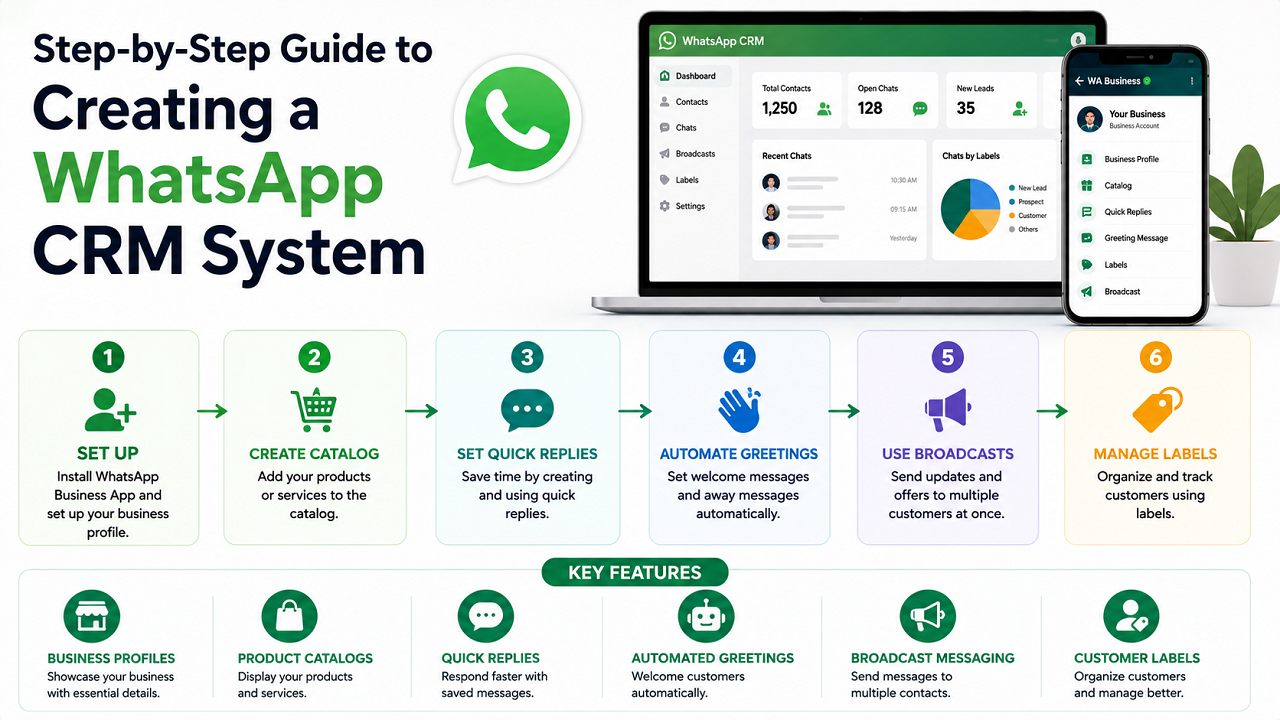
WhatsApp Business App
The WhatsApp Business App is suitable for freelancers and small businesses. It provides:
- Business profiles
- Product catalogs
- Quick replies
- Automated greetings
- Broadcast messaging
- Customer labels
While useful for small operations, it lacks advanced CRM capabilities such as pipelines, ticket management, and detailed reporting.
No-Code CRM Integration
Businesses already using CRM platforms can connect WhatsApp using automation tools.
Popular options include:
- Zapier
- Make
- HubSpot
- Zoho CRM
- Salesforce
- Pipedrive
This approach requires minimal coding but may become difficult to manage as workflows become more complex.
Ready-Made WhatsApp CRM Software
Several platforms offer built-in WhatsApp CRM functionality, including:
- respond.io
- Kommo
- WATI
- Interakt
- AiSensy
- Zoko
- TimelinesAI
- Leadsales
These platforms offer shared inboxes, automation, chatbots, and reporting features. However, businesses remain dependent on third-party pricing and feature limitations.
Custom WhatsApp CRM
A custom WhatsApp CRM provides complete control over:
- Customer fields
- Ticket workflows
- Sales pipelines
- User permissions
- Automation rules
- Reporting systems
For businesses planning long-term growth, a custom WhatsApp CRM often delivers the highest flexibility.
Step 2: Obtain WhatsApp Business API Access
The WhatsApp Business API is essential for creating a professional WhatsApp CRM integration.
Businesses can access the API through:
- Meta WhatsApp Cloud API
- Twilio
- Other authorized WhatsApp providers
The setup process generally includes:
- Creating a Meta Business Account
- Verifying business details
- Connecting a phone number
- Generating API credentials
- Approving message templates
Business verification may require legal documents, website information, and company details. Completing this step early can prevent delays during development.
Once API access is active, your CRM can:
- Receive incoming messages
- Send responses
- Track message delivery
- Log conversation history
- Manage customer interactions automatically
Step 3: Define Your CRM Workflow
A successful WhatsApp CRM should reflect the way your business operates.
Start with a single workflow and expand later.
Customer Support Workflow
A simple support process may look like:
- Customer sends a WhatsApp message
- CRM creates a support ticket
- Agent receives the assignment
- Ticket status updates throughout the conversation
- Issue is resolved and closed
Sales Lead Workflow
For sales teams, the workflow can include:
- New inquiry arrives
- CRM creates a lead profile
- Sales representative adds notes
- Lead stage is updated
- Follow-up reminders are scheduled
Clearly defined workflows prevent missed opportunities and improve customer satisfaction.
Step 4: Build the Core CRM Dashboard
Focus on functionality before adding advanced features.
Your dashboard should include:
- User login system
- Customer database
- Ticket management
- Message center
- Contact profiles
- Team assignment tools
- Status management
Recommended Ticket Statuses
Use simple stages such as:
- New
- Open
- Pending
- Waiting for Customer
- Resolved
- Closed
Essential Customer Information
Store the following details:
- Customer name
- Phone number
- Conversation history
- Assigned agent
- Ticket priority
- Tags and notes
- Creation date
- Last activity date
Keeping customer information organized improves support quality and response speed.
Step 5: Connect WhatsApp Messages to the CRM
After the dashboard is ready, connect WhatsApp messaging through API integration.
The typical message flow works as follows:
- Customer sends a WhatsApp message
- API provider receives the message
- Webhook forwards data to CRM
- CRM creates or updates a ticket
- Agent replies through the dashboard
- Response is delivered back to WhatsApp
What Is a Webhook?
A webhook is an endpoint that receives data automatically whenever a specific event occurs.
For a WhatsApp CRM, you typically need:
- Incoming message webhook
- Delivery status webhook
These connections ensure real-time communication between WhatsApp and your CRM platform.
Step 6: Test the Entire Message Flow
Before launching publicly, perform complete testing.
Send realistic customer messages such as:
- Product inquiries
- Pricing requests
- Appointment bookings
- Delivery questions
- Support requests
Verify the following:
- New tickets are created correctly
- Customer information is saved
- Ticket statuses update properly
- Replies reach WhatsApp successfully
- Delivery statuses are tracked accurately
Testing multiple scenarios helps identify issues before customers encounter them.
Step 7: Launch the Production WhatsApp CRM
Once testing is complete, switch from the development environment to production.
Important launch tasks include:
- Updating API credentials
- Configuring production webhooks
- Connecting approved sender numbers
- Verifying message templates
- Running final system tests
Prepare Your Team
Before announcing the new WhatsApp number:
- Create quick replies
- Define ticket ownership rules
- Establish response time expectations
- Train staff on dashboard usage
A controlled launch with a small customer group can help identify remaining issues.
Step 8: Add Automation and AI Features
After the core system is stable, introduce automation gradually.
Useful Automation Features
Start with:
- Welcome messages
- Away messages
- Ticket assignment
- Follow-up reminders
- Customer satisfaction requests
AI-Powered Features
AI can improve efficiency through:
- Suggested replies
- Conversation summaries
- Ticket categorization
- Sentiment analysis
- Lead qualification
However, human oversight remains important for sensitive customer interactions and complex support cases.
Step 9: Maintain Compliance and Customer Data Security
Compliance is critical when using WhatsApp Business API.
Obtain Customer Consent
Customers should explicitly opt in before receiving proactive messages.
Common opt-in methods include:
- Website forms
- Checkout pages
- QR codes
- Click-to-WhatsApp advertisements
- Direct requests from customers
Understand the 24-Hour Messaging Window
When a customer initiates a conversation, businesses can freely respond for 24 hours.
After that period, only approved message templates may be used for outbound communication.
Protect Customer Data
Implement security measures such as:
- Role-based permissions
- Secure credential storage
- Audit logs
- Data backups
- Restricted admin access
Strong security practices protect both your business and your customers.
Best Practices for Building a Successful WhatsApp CRM
A WhatsApp CRM should simplify operations rather than create additional complexity.
Follow these recommendations:
Keep the Interface Simple
Avoid unnecessary fields and complicated workflows. Focus on information your team actually uses every day.
Design Around Real Business Processes
Every business has unique requirements. Build workflows that match your actual customer journey.
Monitor Team Usage
Review CRM performance regularly and identify:
- Frequently used features
- Unused fields
- Common customer questions
- Repetitive manual tasks
These insights help prioritize future improvements.
Popular WhatsApp CRM Use Cases
Different industries use WhatsApp CRM systems in different ways.
Lead Management
Businesses can automatically capture inquiries, assign lead stages, and schedule follow-ups.
Customer Support
Support teams can manage tickets, track resolutions, and maintain complete conversation histories.
Order Management
Ecommerce businesses can track orders, delivery updates, and payment confirmations.
Appointment Scheduling
Clinics, consultants, and service providers can manage bookings, reminders, and cancellations.
Customer Retention
Businesses can use tags, feedback requests, and follow-up campaigns to increase customer engagement and loyalty.
Scaling Your WhatsApp CRM
The first version of your WhatsApp CRM should focus on reliability rather than complexity.
As your business grows, consider adding:
Advanced Reporting
Track:
- Response times
- Resolution rates
- Lead conversions
- Team performance
Enhanced Automation
Automate repetitive tasks such as:
- Follow-up reminders
- Lead scoring
- Customer onboarding
- Ticket routing
AI Enhancements
Introduce intelligent features that reduce workload while maintaining high-quality customer interactions.
A custom WhatsApp CRM evolves alongside your business, allowing you to continuously improve processes without relying on third-party limitations. By starting with a strong foundation and expanding gradually, businesses can create a scalable customer communication platform that supports long-term growth.
Follow Us on Facebook